



Most AI automation demos stop at the moment the model produces the right answer: the invoice fields extracted, the order understood, the ticket classified. The business value only appears one step later, when that answer becomes a record in the ERP that finance, operations and auditors already trust. That step is usually most of the project, and it is where the engineering lives.
This guide to AI ERP integration covers the five ways to get data into an ERP, the principle that keeps AI automation safe once it is there, the API limits that catch teams out on SAP, NetSuite, Dynamics 365 and Odoo, and how to prove afterwards that nothing was lost.
Five Ways to Get Data Into an ERP
The route matters more than the model. It decides whether the ERP’s own validation runs, whether the integration survives the next upgrade, and whether the vendor will still support your system.
| Route | How it works | When to use it | Main risk |
|---|---|---|---|
| Official API | The ERP’s published REST, OData or RPC interface | The default for almost everything | Rate and concurrency limits |
| Import or staging tables | Records land in a staging area and the ERP imports them in batches | High volumes that do not need to post in real time | Errors surface hours later, in bulk |
| Integration platform | Middleware sits between the automation and several systems | The same data must reach more than one system | Another component to own and monitor |
| Screen automation (RPA) | A bot operates the ERP’s user interface | Older on-premise systems with no usable API | Breaks when a screen changes |
| Direct database writes | Rows are inserted straight into ERP tables | Never | Bypasses validation, corrupts ledgers, voids support |
Direct database writes deserve their place on the list only so they can be ruled out. An ERP keeps a great deal of logic outside its tables: tax calculation, numbering, period controls, approval state, audit history. Writing rows directly skips all of it, and the damage is often discovered at month-end close. Screen automation is a legitimate fallback for systems with no API; the trade-offs are covered in AI automation vs RPA vs AI agents.
Write Drafts, Let the ERP Approve
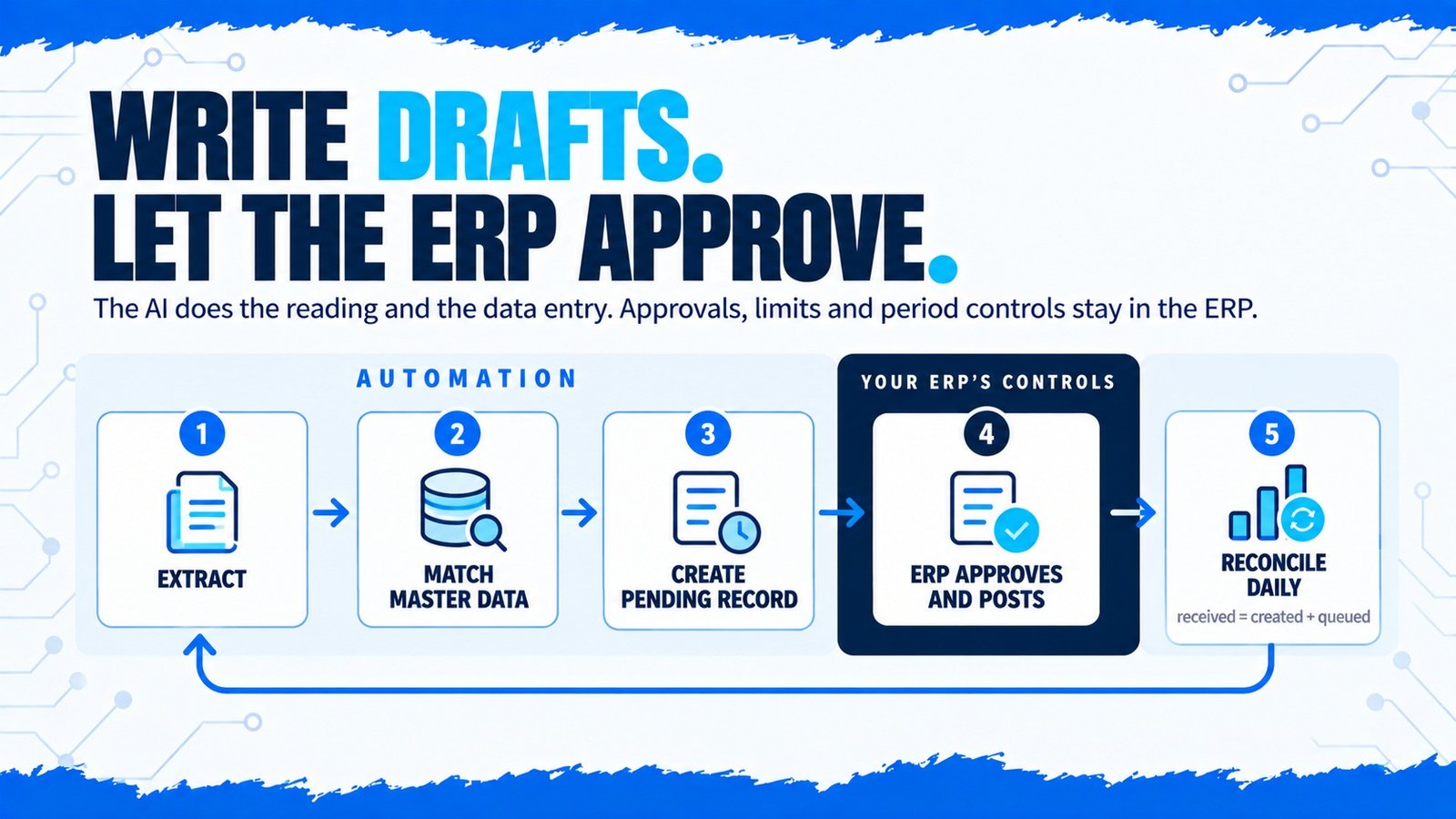
The single most useful design rule for AI ERP integration is this: the automation creates records in a draft or pending state, and the ERP’s own workflow takes them the rest of the way. A vendor bill arrives as pending approval, a sales order as pending fulfilment, a journal as unposted.
This keeps everything the ERP already enforces — approval hierarchies, spending limits, segregation of duties, closed periods — in force. The AI does the reading and the data entry; the controls your auditors signed off stay where they were. It also gives the human review step from human-in-the-loop AI automation a natural home inside a system people already use.
Extract
The model reads the invoice and returns supplier, tax ID, invoice number, date, lines and totals, each with a confidence score. Extraction accuracy and its pitfalls are covered in AI document processing automation.
Match against master data
The supplier is matched on tax ID or bank details, never on name alone, because “ACME Ltd”, “Acme Limited” and “ACME UK” may be one supplier or three. Lines are matched to the purchase order and receipt.
Create a pending bill
The integration creates the vendor bill in a pending-approval state, attaches the original PDF, and sets an external ID derived from the supplier and invoice number so a retry can never create a duplicate.
Let NetSuite route it
NetSuite’s own approval routing sends the bill to the right approver. Matched, low-value bills can be auto-approved by a rule the finance team owns, not by the AI.
Reconcile daily
Invoices received equals bills created plus invoices waiting in the exception queue. Any gap raises an alert the same day, not at month-end.
The Problems Nobody Demos
What to Watch on Each ERP
| ERP | Preferred route | What catches teams out |
|---|---|---|
| SAP S/4HANA | Released APIs (OData), or side-by-side extensions on SAP BTP | Only released APIs are upgrade-safe; custom code in the core conflicts with clean core |
| Oracle NetSuite | SuiteTalk REST web services or RESTlets | One account-wide pool of concurrent requests shared by every integration: 15 on Service Tier 1, plus 10 per SuiteCloud Plus licence |
| Microsoft Dynamics 365 | Dataverse Web API with an application user | Service protection limits per user, per web server: 6,000 requests and 20 minutes of execution time in a rolling five-minute window, and 52 concurrent requests; excess returns HTTP 429 with a Retry-After header |
| Odoo | JSON-2 API from Odoo 19 | XML-RPC and JSON-RPC still work but are deprecated; build new integrations on JSON-2 |
The NetSuite limit is the one that most often surprises people, because it is shared. If an e-commerce connector, a payroll sync and a new AI integration all run at nine in the morning, they compete for the same handful of slots and one of them starts failing. The fix is a queue with controlled concurrency in front of the ERP, which also gives you a natural place to retry with back-off. Middleware patterns for exactly this kind of buffering are discussed in our piece on middleware in IoT; the principles carry over directly.
Proving Nothing Was Lost
An integration that posts correctly 99.9 percent of the time and loses the rest silently is worse than a manual process, because nobody is looking for the missing records. Reconciliation is what turns “it seems to work” into evidence.
- Counts: items received equals records created plus items in the exception queue plus items rejected, every day
- Totals: the value of invoices received matches the value of bills created and queued
- Trail: each ERP record links back to its source document, the model version, the confidence scores and the person who approved it
- Ageing: nothing sits in the exception queue past an agreed deadline without an alert
Auditors do not ask whether the AI was accurate. They ask how you know every document became exactly one record. Build the answer before they ask.
Before You Connect to Production
Frequently Asked Questions
Conclusion
An AI model that reads invoices well is the easy half. The half that decides whether the project pays is a disciplined integration: the official API, a dedicated user, drafts rather than postings, idempotent writes, a queue that respects the ERP’s limits, and a reconciliation that proves every document became exactly one record.
Integration with real ERP and legacy systems is the work we specialise in, and it is the reason most automation never leaves the demo, as covered in why AI automation projects fail. If you are planning to connect automation to your system of record, our AI automation services start with exactly this design.