




Document processing is where most businesses meet AI automation first, and for good reason: invoices, orders, delivery notes and forms arrive in a hundred different layouts, and a person has to retype them into a system. It is high volume, repetitive, and expensive in a way that is easy to measure.
It is also where vendor claims and real-world results diverge most sharply. Published benchmarks put industry-average extraction accuracy around 92.7 percent, while platform vendors advertise 99.5 percent field-level accuracy. Both figures can be true at once, and neither tells you what you actually want to know. This guide explains what the numbers mean, why the exception rate matters more than the accuracy rate, and what the economics look like when you work them out properly.
What Document Processing Automation Actually Does
The term covers a chain of five distinct steps. Vendors sell them as one product, but they fail in different ways and should be evaluated separately.
Capture
Getting the document in: an email attachment, a scanned PDF, a photograph from a phone, an EDI feed, a shared folder. Image quality decided here sets a ceiling on everything after it.
Extract
Pulling out the fields. The industry has largely moved from template-based OCR, which needed a layout configured per supplier, to machine-learning extraction that reads documents it has never seen. This is the step everyone quotes accuracy figures for.
Validate
Checking the extracted values against reality: does this supplier exist, does the purchase order match, do the line items sum to the total, is the tax calculation right. This step should be deterministic code, not a model.
Post
Writing the result into the system of record — the ERP, the accounting package, the order system. Without this step you have a very expensive way of producing a spreadsheet.
Escalate
Routing anything uncertain or failing validation to a person, with the document, the extracted values and the reason shown together. This is the step most pilots leave until last, and it is the one that decides whether the project pays.
The Number Nobody Explains
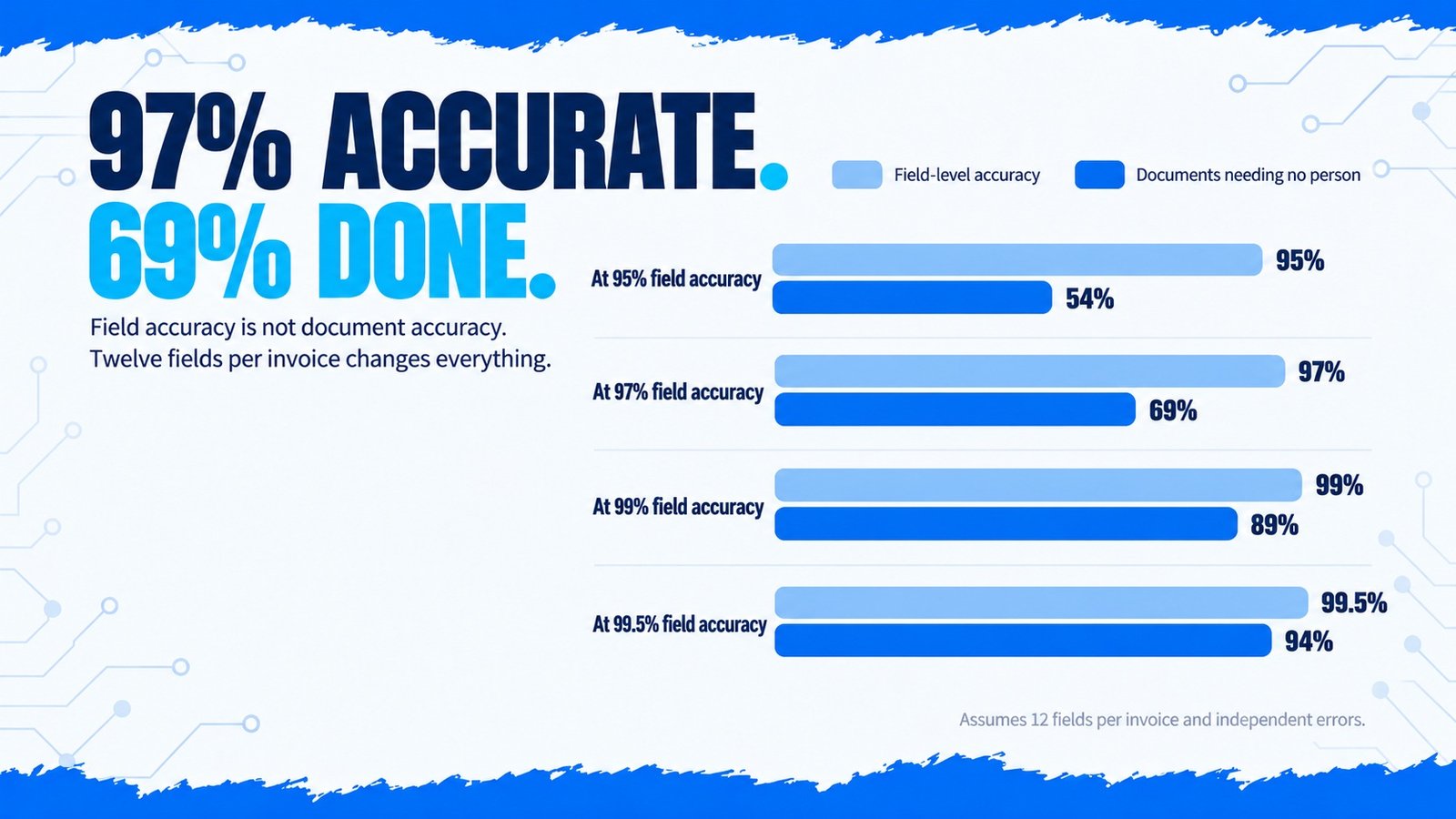
Accuracy figures in this field are almost always field-level: the percentage of individual fields extracted correctly. What you care about is document-level: the percentage of documents where every field is right, because one wrong field means a person has to open it.
Those are very different numbers. A typical invoice carries around twelve fields you need — supplier, invoice number, date, due date, currency, net, tax, total, purchase order reference, and the line items. If each field is extracted correctly 97 percent of the time and the errors are independent, the share of invoices that come through perfectly is 0.97 to the power of twelve:
| Field-level accuracy | Documents with all 12 fields correct | Documents needing a person |
|---|---|---|
| 95% | 54% | 46% |
| 97% | 69% | 31% |
| 99% | 89% | 11% |
| 99.5% | 94% | 6% |
That table explains why a demo can look flawless and a deployment can still feel disappointing. The jump from 97 to 99.5 percent field accuracy sounds like a rounding difference. It is the difference between a person touching one invoice in three and one in sixteen.
Accuracy also varies sharply with the input. Published 2026 benchmarks report around 96.5 percent on clean digital invoices and about 87.5 percent on scanned receipts. Header fields such as supplier, invoice number and total are now routinely above 97 percent; line items, which carry most of the fields, are where the real differences between platforms show up.
Ask a vendor for document-level straight-through rate on your own documents. A field-level accuracy figure from their benchmark set answers a question you did not ask.
Why the Exception Rate Decides the Business Case
Work an example through. A finance team processes 2,000 supplier invoices a month, and each one takes about six minutes to key in and check — 200 hours of work.
- 1,800 invoices post automatically, needing no one
- 200 escalate and take roughly ten minutes each, because someone has to find what went wrong: 33 hours
- Plus a spot-check sample of the automated ones: about 7 hours
- Total: 40 hours, down from 200
- 600 invoices escalate at ten minutes each: 100 hours
- Plus the same spot-check: about 7 hours
- Total: 107 hours — nearly three times the labour
Both deployments might advertise the same extraction engine. The difference is entirely in how well the system handles the documents your suppliers actually send, and how quickly a person can resolve an exception when it appears.
Note also that exceptions cost more per document than manual processing did. A person doing data entry works in a rhythm; a person investigating why the automation was unsure has to reconstruct the context first. Design the escalation screen badly and you can automate 90 percent of the volume while saving far less than 90 percent of the time.
What It Costs and What It Saves
Reported industry figures for 2026 put manual invoice processing at roughly $15 per document all-in, falling to $2–$5 once automated, with cycle times down by up to 70 percent. Those are plausible for a well-run deployment on reasonable input. The ranges below are market figures, not our pricing.
| Line item | Typical range | Notes |
|---|---|---|
| Build and integration | $7,000 – $40,000 | Driven almost entirely by how many systems it must write to |
| Extraction platform | Per document or per page | Falls steeply with volume; check the line-item surcharge |
| Hosting and monitoring | Monthly | Higher if self-hosted for data residency reasons |
| Exception handling | Ongoing staff time | The item most business cases omit entirely |
| Supplier onboarding | Ongoing | New layouts appear continuously; budget for drift |
For a wider view of what moves an automation quote, see our breakdown of AI automation cost, and for how to turn these figures into a defensible payback number, AI automation ROI.
How to Evaluate a Document Automation Platform
The underlying principle is the one we apply to every workflow: AI handles the understanding, rules handle anything that must be exact. That boundary is set out in AI automation vs RPA vs AI agents.
Frequently Asked Questions
Conclusion
Document processing is one of the clearest automation wins available, and it is routinely undersold by the figures used to describe it. Field-level accuracy is the number vendors publish; document-level straight-through rate is the number that pays your invoice.
Evaluate on your own worst documents, measure how many post without a human touch, and time how long an exception takes to resolve. Those three measurements will tell you more about the business case than any benchmark table, including this one. If you want that assessment run properly before you commit, our AI automation services start with exactly that audit.