



Almost every AI automation project ends up with a person somewhere in the loop. The question that decides whether the project works is not whether to include one, but where. Put the person at every step and you have built an expensive way of doing the work twice. Put them nowhere and the first confident mistake reaches a customer, a supplier or the general ledger before anyone notices.
This guide to human-in-the-loop AI automation covers the four places a person can sit, how to choose a confidence threshold with arithmetic rather than instinct, and the problem most designs ignore: reviewers who stop reading because the machine is usually right.
Four Places to Put the Person
Human-in-the-loop is often described as a single design. In practice there are four distinct patterns, and most production systems combine three of them.
| Pattern | How it works | Use it for | Cost |
|---|---|---|---|
| Approve before acting | The system prepares the action; a person approves every one | Irreversible or high-value actions: payments, contract changes, deletions | Slow, and reviewers tire quickly |
| Exception-only review | Cases below a confidence threshold go to a person; the rest proceed | High-volume work with a clear right answer | Depends entirely on where the threshold sits |
| Act, then sample | Everything proceeds; a person audits a random sample afterwards | Low-impact, easily reversed actions such as tagging and routing | Cheap, but errors are found after the fact |
| Escalate by rule | Fixed triggers send a case to a person regardless of confidence | Known danger: new suppliers, changed bank details, values above a limit | Low, and the most underused of the four |
The usual production design is exception-only review for the bulk of the volume, escalation rules for the cases where being wrong is expensive, and a small audit sample of everything that went through automatically. The audit sample is what tells you whether the threshold is still right six months later.
Confidence tells you how sure the model is. It does not tell you how much a mistake costs. Escalation rules exist for the second question.
Choosing a Threshold With Numbers
Most teams pick a confidence threshold of 0.9 or 0.95 because it sounds safe. The right threshold is the one where the cost of reviewing cases and the cost of errors that slip through add up to the smallest total. You can find it from a labelled sample of past work.
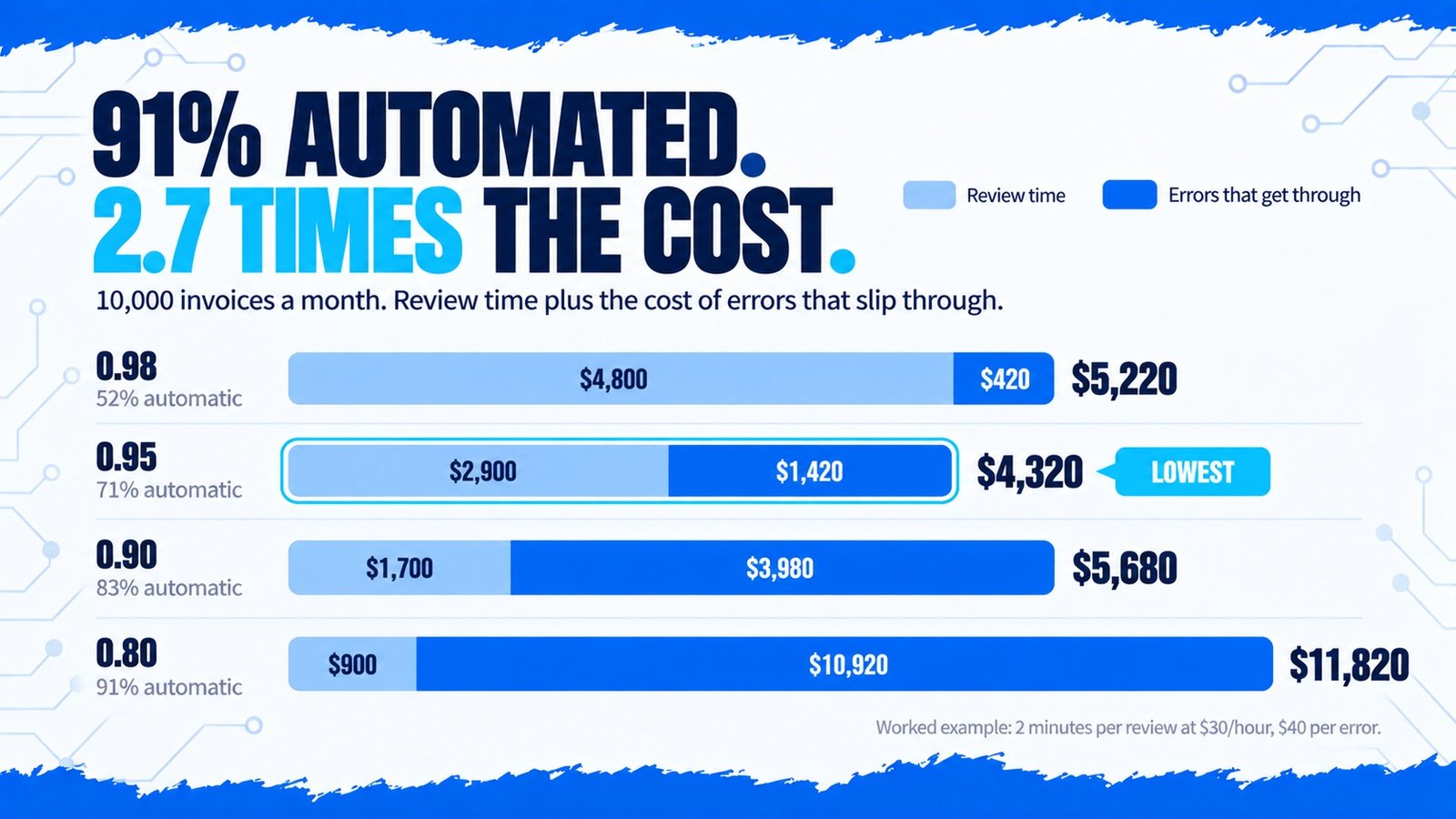
Here is a worked example for a finance team processing 10,000 supplier invoices a month. The team ran the model over 2,000 historical invoices whose correct values were already known, then measured what would have happened at four thresholds. A review takes two minutes at a loaded cost of $30 an hour, and an error that reaches the ledger costs about $40 to find and correct.
| Threshold | Processed automatically | Error rate in those | Review cost | Error cost | Monthly total |
|---|---|---|---|---|---|
| 0.98 | 52% | 0.2% | $4,800 | $420 | $5,220 |
| 0.95 | 71% | 0.5% | $2,900 | $1,420 | $4,320 |
| 0.90 | 83% | 1.2% | $1,700 | $3,980 | $5,680 |
| 0.80 | 91% | 3.0% | $900 | $10,920 | $11,820 |
At 0.95, 2,900 invoices go to a person (97 hours, $2,900) and about 36 errors slip through ($1,420). That is the cheapest row. The highest automation rate, 91 percent, is the most expensive option by a wide margin, because its errors cost more than all the review time it saves.
Suppose a single error can send a payment to the wrong bank account, and each one costs $400 rather than $40. At 0.95 the errors now cost $14,200 and the total jumps to $17,100. At 0.98 the total is $8,960. The cheapest threshold moves, because the threshold depends on the cost of being wrong, not on the model.
This is why one threshold rarely fits a whole workflow. A sensible design runs routine invoices at 0.95 and sends anything touching bank details to a person every time, whatever the model’s confidence. That second part is an escalation rule, and it is cheap because those cases are rare.
When Reviewers Stop Reviewing
A reviewer who approves 98 cases in a row soon learns to approve the 99th without reading it. This is automation bias, and it quietly turns a human check into a human signature. The review queue still exists and the audit log still shows an approver, but nobody is actually looking.
Where Oversight Is Required, Not Optional
For most back-office automation, human review is a design choice made on cost and risk. In some areas the law makes it for you.
Under GDPR Article 22, people have the right not to be subject to a decision based solely on automated processing when it has legal or similarly significant effects on them, such as a refused credit application. If a workflow makes decisions about individuals, a meaningful human step is often the simplest way to stay on the right side of that rule.
The EU AI Act goes further for systems it classes as high-risk, which include AI used in hiring, credit scoring and access to essential services. Article 14 requires those systems to be designed so a person can understand the output, intervene, override it and stop the system. The 2026 Digital Omnibus pushed the main high-risk deadline back to December 2027, but it did not change what Article 14 requires. Most invoice, ticket and document workflows fall outside the high-risk categories, but anything that ranks applicants or decides eligibility should be checked early rather than retrofitted.
Building the Review Step Properly
Getting this layer right is also what makes the business case hold. The exception path is where most of the remaining cost lives, which is why it features so heavily in AI automation ROI and in the economics of AI document processing automation. For agents that can take actions rather than just suggest them, the approval step is also a security control, covered in AI agent security.
Frequently Asked Questions
Conclusion
The person in the loop is not a safety blanket thrown over the automation at the end. It is a component with a cost, a failure mode and a position that should be chosen deliberately. Decide what an error costs, measure where the threshold should sit, write rules for the dangers you already know about, and check that the reviewers are still reading.
Most failed automation projects did not lack a human step; they had one in the wrong place or one that had quietly stopped working, as covered in why AI automation projects fail. We design AI automation with the review step treated as part of the system, measured like the rest of it.