


Logo home 9

Over 10 years we helping companies reach their financial and branding goals. Onum is a values-driven SEO agency dedicated.

CONTACTS
Embedded IoT Solutions

IoT Dashboard Design: What to Show and What to Automate

Category
Embedded IoT Solutions
Read Time
6 min read
Published
April 2, 2026
Status
Published

The problem is rarely the dashboard. It is that building one is treated as the finish line, and designed as though more information is always better.

Dashboards get a bad reputation in IoT, and mostly unfairly. The problem is rarely the dashboard itself — it is that building one is treated as the finish line, and that the dashboard is designed as though more information is always better.

A well-designed operational dashboard is genuinely valuable. A badly designed one gets opened twice and then never again, taking the credibility of the whole programme with it.

This guide is about designing the dashboard properly: what belongs on it, what belongs in automation instead, and the design decisions that determine whether anybody still uses it after a month.

Diagnosis

Why Most IoT Dashboards Stop Being Used

They show everything available
Built from what the data contains rather than what the user decides. Every sensor gets a chart, and the one number that matters is somewhere on page three.
They require interpretation
A line going up means nothing without knowing what normal looks like for that asset. If the user must remember context the screen does not supply, most will not.
They hide data age
A value from six hours ago rendered exactly like a live one is actively dangerous, and it is the fastest way to destroy trust once somebody notices.
They live outside the workflow
A separate portal requiring a separate login competes with tools people already have open. It loses.
They answer questions nobody asked
Impressive visualisations of data that changes nothing. Interesting is not the same as useful.

A dashboard is used when it answers a question somebody already had. It is abandoned when it presents information somebody must find a use for.

Design

Designing Around Decisions, Not Data

1

Start from the questions, written down

Interview the actual users and list the questions they ask during a shift. “Which machines need attention today?” “Did last night run normally?” “Is this site worse than the others?” Each question becomes a view; anything not answering a listed question does not belong.

2

Lead with status, not with charts

The top of the screen should answer “is anything wrong?” in one glance — a short list of assets needing attention, ordered by urgency. Charts are for investigating after the answer is yes, not for discovering it.

3

Show normal alongside current

A reading is meaningless without a reference. Display the expected range, the asset’s own recent baseline, or how peers are performing, so interpretation does not depend on the viewer’s memory.

4

Make data age and gaps explicit

Timestamp every value, grey out stale ones, and draw gaps as gaps. Never interpolate across an outage — a system that looks healthiest when it is least reliable is worse than no system.

5

Put the next action on the screen

If an asset needs attention, the dashboard should offer the thing the user would do next: raise a work order, acknowledge, view the procedure. Requiring the user to leave and re-enter the information elsewhere is where most workflows break.

6

Design for the device it is used on

Operations staff are frequently on a phone in a plant, not at a desk. A dense multi-panel layout that requires a large screen will not be consulted where decisions are actually made.

Boundary

What Should Not Be on a Dashboard At All

Some things look like dashboard content and are better handled another way.

If the information is…It belongs in…
Urgent and requires immediate responseAn alert with escalation, not a screen someone must be watching
A repeated judgement with a clear ruleAutomation, with the dashboard showing what was done
Reviewed weekly or monthlyA scheduled report, not a live view
Needed by another systemAn API or integration, not a human copying numbers
Interesting but never acted onNowhere — remove it

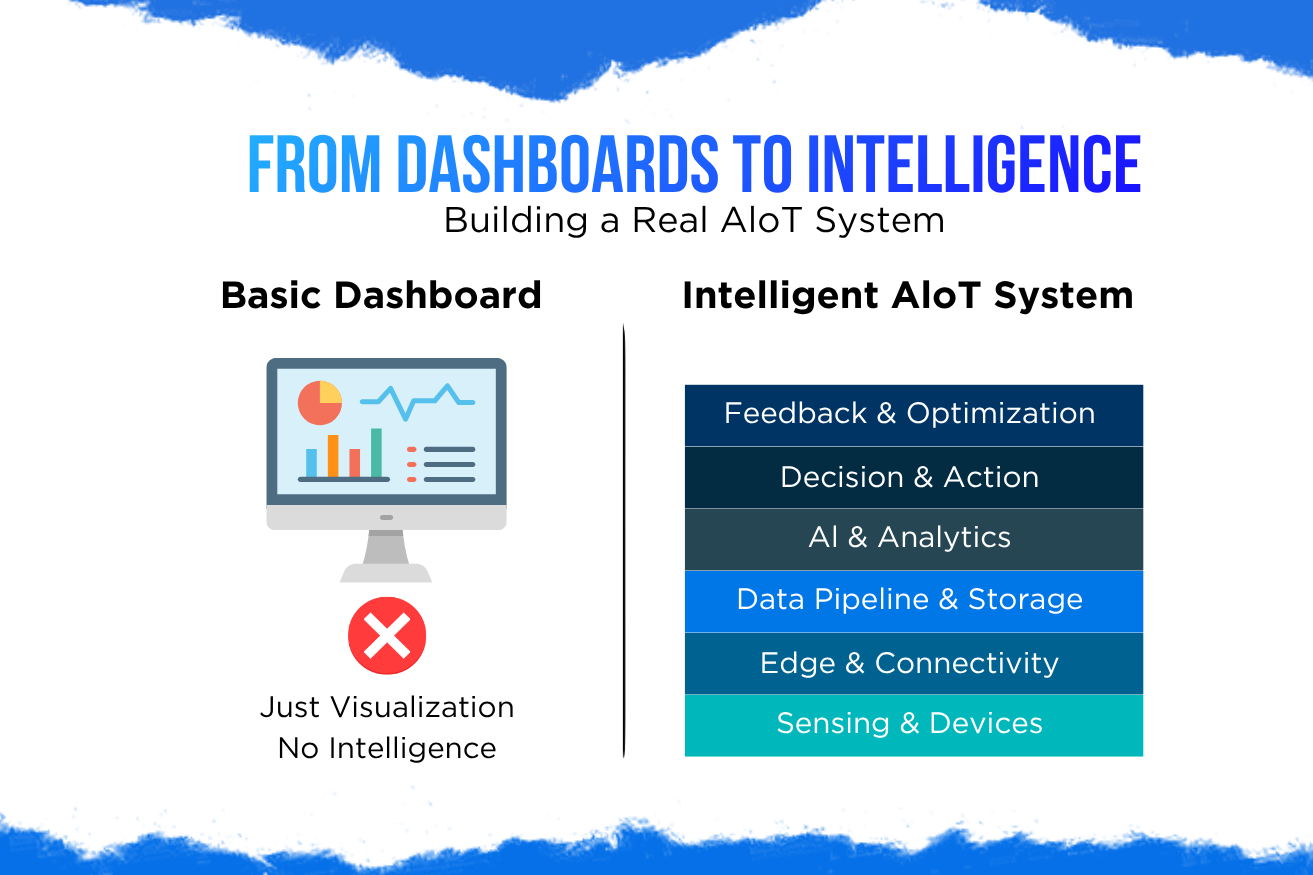
The second row is the one that matters most as systems grow. Any judgement a person makes the same way every time is a candidate for automation, and moving it off the dashboard is how a system scales beyond the attention available — the distinction explored in autonomous systems versus dashboards.

Practice

Keeping a Dashboard Useful Over Time

1Measure whether it is opened
Usage per user per week is the honest health metric. Falling usage means the dashboard stopped answering real questions, and no redesign will fix a view nobody needs.
2Remove a panel for every one you add
Dashboards accumulate. A deliberate budget on screen space keeps the signal from being diluted by things added for one meeting two years ago.
3Watch someone use it without helping
Where they hesitate is a design fault, not a training problem. This takes twenty minutes and usually changes the layout substantially.
4Embed it where people already work
A view inside the maintenance system or a summary in the team’s existing channel beats a standalone portal every time.
5Show data quality on the dashboard itself
Device coverage and completeness belong in view, so users know how much of the picture they are actually seeing.
6Automate anything decided the same way twice
Each repeated judgement moved into automation frees attention for the cases that genuinely need a person.
FAQ

Frequently Asked Questions

Why do IoT dashboards stop being used?
Because they show everything available rather than answering specific questions, require context the screen does not provide, render stale data like live data, sit outside the tools people already use, and present information nobody acts on.
How should an IoT dashboard be designed?
Start from the questions users actually ask during a shift, lead with status rather than charts, show normal alongside current values, make data age and gaps explicit, put the next action on the screen, and design for the device it will be used on.
What should not go on a dashboard?
Anything urgent, which belongs in an alert with escalation; any repeated judgement with a clear rule, which belongs in automation; periodic reviews, which belong in scheduled reports; data another system needs, which belongs in an API; and anything never acted on, which should be deleted.
Does a dashboard make an IoT system intelligent?
No. A dashboard presents information for a person to interpret and act on, which means the system’s capacity is limited by human attention. Intelligence means the system reaches conclusions and acts within defined limits, with the dashboard showing what it did.
How do you know if a dashboard is working?
Measure how often each user opens it per week. Falling usage means it stopped answering real questions. Watching someone use it without assistance also reveals design faults quickly — hesitation indicates a layout problem rather than a training need.
Wrapping Up

Conclusion

Dashboards do not make a system intelligent, but a good one makes a system usable — and most IoT dashboards are built from the data available rather than the decisions required.

Design from the questions people actually ask, lead with status, always show what normal looks like, be honest about data age, and put the next action within reach. Then keep moving repeated judgements into automation, so the dashboard shrinks as the system matures instead of growing until nobody opens it.

About MetaDesk Global

Engineering the Next Generation of Connected Products

MetaDesk Global helps startups and enterprises develop intelligent connected products that combine embedded systems, Industrial IoT, Edge AI, and cloud technologies. Our expertise includes:

Industrial IoT (IIoT) Solutions Embedded Firmware Development Edge AI Development Predictive Maintenance Systems PCB Design IoT Gateway Development Cloud Integration OTA Firmware Updates AIoT Product Development End-to-End Product Engineering

From hardware design to AI-powered industrial platforms, we build scalable solutions for the next generation of connected products.

Start Your Project

Building a Connected Product?

We design IIoT sensor networks, Edge AI pipelines, and secure cloud platforms — from prototype to production.

Request a Free Quote →