



Most automation platform comparisons rank features. That is rarely what decides the choice. In practice three things do: where your data is allowed to live, how the platform counts what you pay for, and who will maintain the thing after it is built.
This comparison covers Zapier, Make and n8n on those terms. We build on all three and have no reseller relationship with any of them, so the recommendation at the end is a decision rule rather than a winner.
Side by Side
| Zapier | Make | n8n | |
|---|---|---|---|
| Hosting | Cloud only | Cloud only | Cloud or self-hosted |
| Source | Proprietary | Proprietary | Open source |
| Integrations | 8,000+ | 3,000+ | ~1,500 nodes, plus raw HTTP |
| Billing unit | Per task (each step) | Per operation (each module run) | Per workflow execution |
| Branching and loops | Basic | Strong visual | Strong, plus code nodes |
| Custom code | Limited | Moderate | Full JavaScript and Python |
| AI capability | AI agents, fixed shape | AI modules | Native agent node, LangChain, self-hosted models |
| Who maintains it | Anyone | Someone technical | An engineer |
| Best when | Breadth of apps matters most | Complex logic, no engineer available | Volume, data control or custom AI |
The integration counts are the figures most often quoted and the least often decisive. If the five systems you need are supported by all three, 8,000 connectors is not an advantage. If the one system you need has no connector anywhere, every platform falls back to an HTTP request and the difference evaporates.
The Billing Unit Is the Real Difference
All three bill for usage, but they count different things, and the gap compounds with every step you add to a workflow.
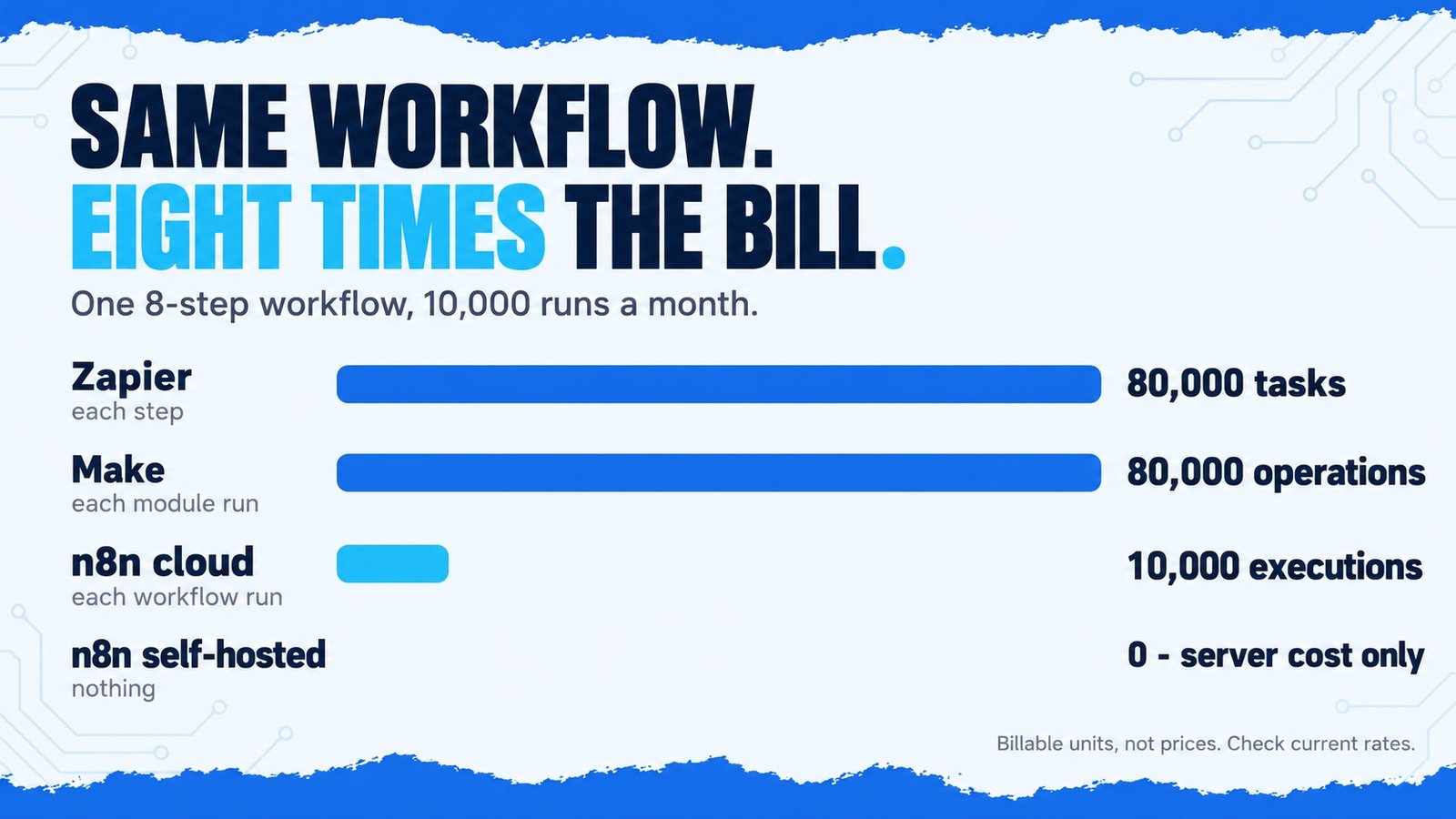
Take one workflow with eight steps — a trigger, two lookups, a branch, an AI classification, a transformation and two writes — running 10,000 times a month:
| Platform | Counts | Billable units per month |
|---|---|---|
| Zapier | Each step that runs | ~80,000 tasks |
| Make | Each module run | ~80,000 operations |
| n8n cloud | Each workflow run | 10,000 executions |
| n8n self-hosted | Nothing — server cost only | 0 |
Same work, eightfold difference in billable units. Published prices change often enough that quoting them here would be unhelpful, so check the current rates — but the structure above is stable, and it is what makes the bill surprising six months in.
The structure also shapes how people build. Per-operation billing quietly encourages small, simple workflows and discourages the error handling, retries and logging that make automation reliable, because each of those costs money every run. Per-execution billing encourages consolidating work into fewer, larger workflows. Neither incentive is about good engineering.
Estimate billable units before you choose, not after. The platform that looks cheapest at 500 runs a month is often the most expensive at 50,000.
Where Your Data Goes
Zapier and Make are cloud services. Every record a workflow touches — the customer details in the CRM lookup, the contents of the invoice, the text of the support ticket — passes through their infrastructure. For most businesses that is perfectly acceptable, and both are well-run platforms with serious security programmes.
For some, it is a hard stop. If you handle patient records, financial data under strict residency rules, defence supply-chain information, or commercially sensitive production data, a cloud-only platform may be unusable regardless of how good it is. n8n is the only one of the three you can run entirely on your own infrastructure, where the data never leaves and you decide the retention, the encryption and the upgrade schedule.
This is not an abstract concern. It is the single most common reason we end up on n8n for a client rather than a cloud platform — not because it is better, but because it is the only one that satisfies the constraint.
How They Handle the AI Step
Zapier
AI actions and agents are available and easy to configure. The shape is largely fixed, which is a strength for anyone who wants a working classification step quickly and a limitation if the task needs a specific prompt structure, tool set or retry behaviour.
Make
AI modules sit alongside everything else in the visual builder and compose well with Make’s strong branching. Good for a workflow where the AI step is one decision among many, less suited to orchestrating an agent with its own tools.
n8n
A native AI agent node, LangChain integration, and the ability to point at a self-hosted model rather than a third-party API. This is the most flexible of the three and also the one most likely to let you build something more complicated than the problem requires.
Whichever platform you choose, the decision about what kind of automation the process needs comes first — a fixed rule, a flow with an AI step, or an agent choosing its own actions. That distinction is covered in AI automation vs RPA vs AI agents, and it matters more than the platform.
Which One to Choose
One caveat on self-hosting: running n8n yourself means running a server, backups, updates and monitoring. That is straightforward for an engineering team and a genuine burden for a business without one. Count that cost honestly — it belongs in the comparison alongside the subscription you are avoiding, and in the ROI calculation.
Frequently Asked Questions
Conclusion
There is no best platform here, only a best fit for three constraints. If your data cannot leave your infrastructure, the decision is made for you. If volumes are high and workflows are long, the billing unit will dominate the cost. If nobody technical will maintain it, pick the one your team can actually operate, even if it is not the most capable.
Everything else — connector counts, interface preferences, feature tables like the one above — is secondary to those three. We build on all of them and choose per project; if you want that choice made against your constraints rather than a vendor’s, that is part of how we scope AI automation projects.